
One hostname, two clusters with EdgeCDN-X
Bring multi-cluster DNS routing into your Kubernetes workflow.
Running your application in two Kubernetes clusters gives you more options. But how do you keep one familiar address for users while choosing which cluster should answer? With ExternalDNS and EdgeCDN-X, you can manage that choice alongside your application configuration.
One address, more possibilities
ExternalDNS keeps DNS records in step with your Kubernetes resources. The EdgeCDN-X webhook connects that workflow to EdgeCDN-X, adding routing choices beyond simply pointing a hostname at an IP address.
Each cluster contributes its own destination to a shared hostname. You can update those destinations and their routing settings through your application configuration, rather than maintaining a separate set of DNS changes by hand.
Choose the approach that fits your application:
- Weighted routing: give one destination more preference than another.
- Geolocation: choose destinations based on the user's country or continent, with a catch-all option.
- Failover: prefer a primary destination and use a fallback when no healthy matching node remains.
- Round robin: rotate DNS answers across matching locations.
Optional health checks help EdgeCDN-X avoid unhealthy nodes when selecting an answer. These are DNS routing decisions, not a guarantee of an exact split of application requests: caching also influences where traffic goes.
A small demo with a practical purpose
Our demo uses two local clusters, kind-fra and kind-ams, sharing e2e.tbotech.sk. The names represent Frankfurt and Amsterdam routing identities; both clusters actually run locally.
The guide shows how to give Frankfurt a weight of 70 and Amsterdam a weight of 30, then explains geolocation and primary/fallback alternatives. It's a way to explore multi-cluster DNS without first deploying a full application stack.
A minimal quick-start
1. Prepare your destinations. Use existing Kubernetes clusters or, with Docker running, create two local ones:
kind create cluster --name fra
kind create cluster --name ams
2. Connect ExternalDNS to EdgeCDN-X. You'll need a Project, a Zone covering your hostname, and a Project-scoped API key. In each cluster, deploy ExternalDNS with the ghcr.io/edgecdn-x/edgecdnx-external-dns-webhook:latest sidecar, supplying the key through a Kubernetes Secret. The deployment section has the ready-to-copy manifest.
Use TXT owner/prefix pairs fra/fra- and ams/ams- so each cluster keeps its own DNS ownership identity.
3. Publish the same hostname from both clusters. Save this as ingress-fra.yaml, replacing the demo hostname and documentation IP with your own:
apiVersion: networking.k8s.io/v1
kind: Ingress
metadata:
  name: e2e-app
  namespace: default
  annotations:
    external-dns.kubernetes.io/set-identifier: kind-fra
    external-dns.kubernetes.io/webhook-edgecdnx-routing: wrr
    external-dns.kubernetes.io/webhook-edgecdnx-weight: "70"
spec:
  rules:
    - host: e2e.tbotech.sk
      http:
        paths:
          - path: /
            pathType: Prefix
            backend:
              service:
                name: e2e-backend
                port:
                  number: 80
Copy it to ingress-ams.yaml. Keep the same hostname, but use Amsterdam's set-identifier as kind-ams, and "30" as the weight. Then apply:
kubectl --context kind-fra apply -f ingress-fra.yaml
kubectl --context kind-ams apply -f ingress-ams.yaml
The explicit target lets you test DNS provisioning without an Ingress controller or backend Service. Serving real traffic still requires a reachable application.
4. Check the result. After reconciliation, look in your EdgeCDN-X Project for two Locations:
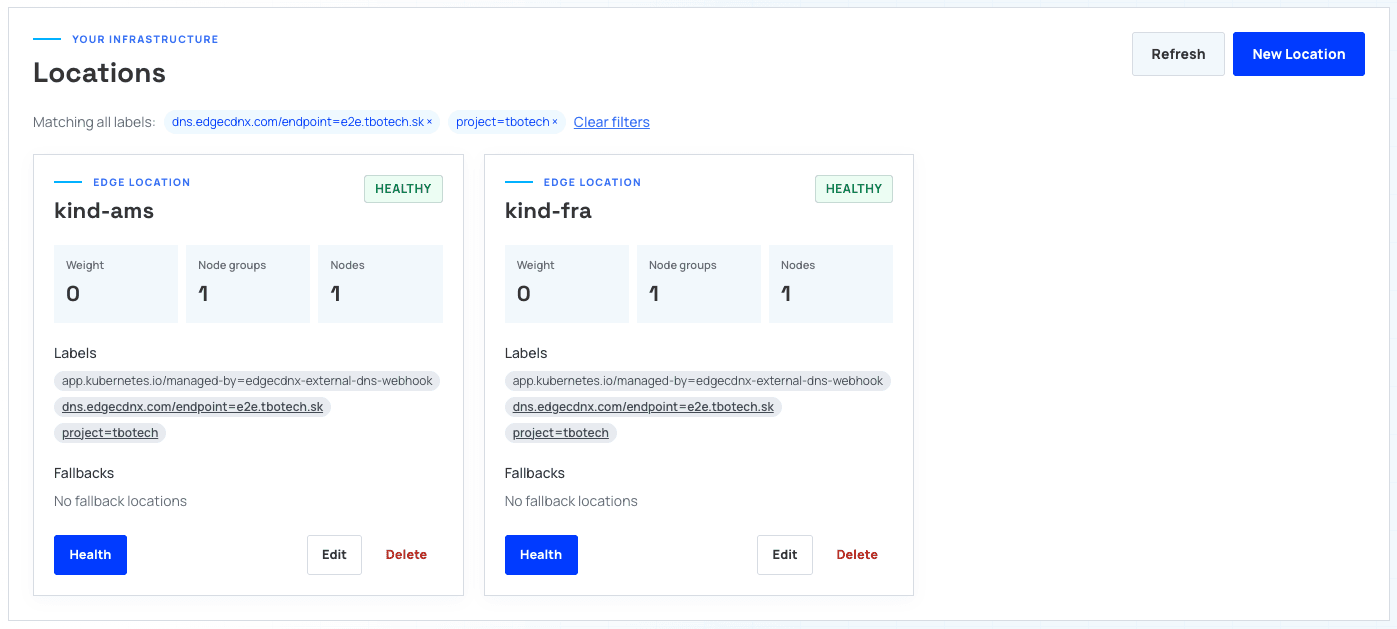
and one shared Weighted DNS endpoint:
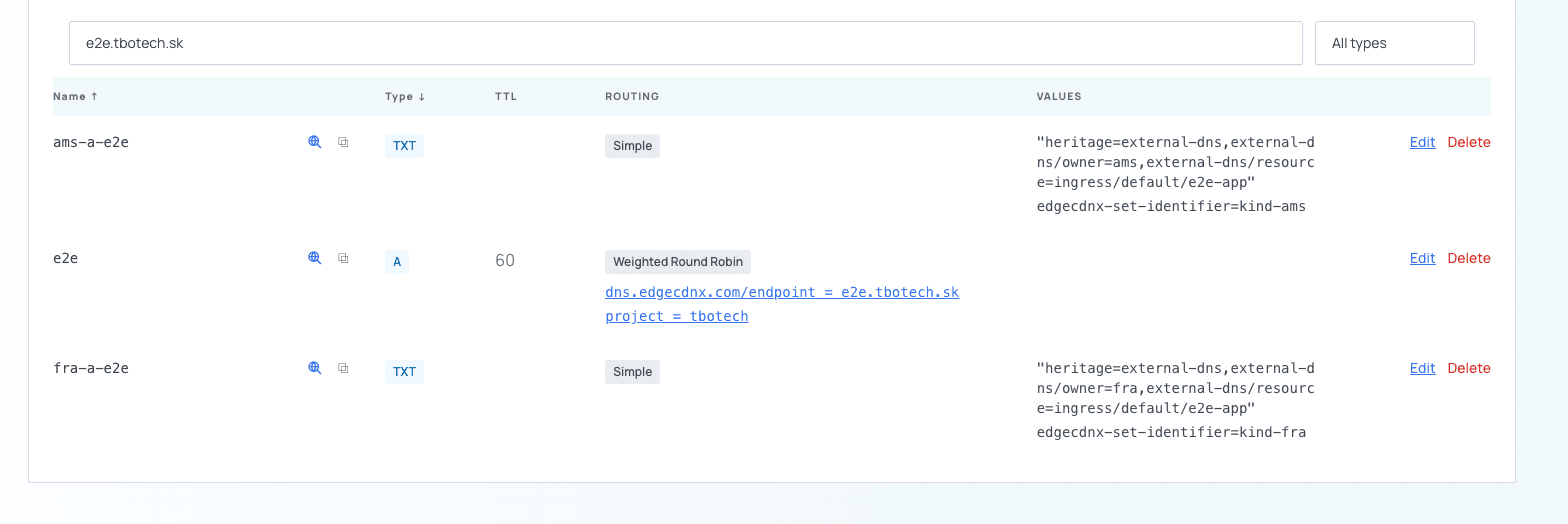
If something is missing, check each cluster's webhook logs:
kubectl --context kind-fra -n external-dns logs deployment/external-dns -c edgecdnx-webhook --tail=20
kubectl --context kind-ams -n external-dns logs deployment/external-dns -c edgecdnx-webhook --tail=20
For full deployment details, health checks, and other routing options, follow the ExternalDNS deployment guide.
If you want to go right ahead and deploy the External-DNS Webhook, you'll find the sources here: